Hi,
new to the forum and will soon be purchasing a Kronos, for the last few years I have been the owner of a Roland FA
My enquiry is about live play
so if i perform Mr Blue Sky which has 3 parts and as I understand it I would need;
- A programme for Piano
- A combi (with layers and splits)
- another combi with layers and splits
So my question is, could you put these 3 items into a single set list slot called Mr Blue Sky
and if so, how you could navigate between the 3, could you use an inc and dec pedal?
Appreciate any help given.
Matthew
Soon to be owner of a Kronos
Moderators: Sharp, X-Trade, Pepperpotty, karmathanever

-
StephenKay

- KARMA Developer<br>Approved Merchant

- Posts: 2997
- Joined: Tue Jun 18, 2002 2:16 am
- Location: Scottsdale, AZ
- Contact:
Re: Soon to be owner of a Kronos
No, not exactly. The previous reply was helpful, but not entirely correct.Matthew1971 wrote:Hi,
So my question is, could you put these 3 items into a single set list slot called Mr Blue Sky
and if so, how you could navigate between the 3, could you use an inc and dec pedal?
You can put those 3 items into 3 consecutive set list slots in one of the set lists. And yes, then you can use a pedal to switch between them. But it would be 3 different slots.
Also, and I'm not an expert on this since I don't do live performances, but you can only use a pedal to either inc or dec - not both (unless perhaps you program a programmable pedal in a custom way). However, that simply means that if, for example, you can only use the pedal to move to the next slot, then you might put those slots in the set list more than once. You might have, for your performance of Blue Sky:
slot 1: piano
slot 2: split 1
slot 3: split 2
slot 4: piano (again)
slot 5: split 2 again ... and so on, for however many changes you need.
There are plenty of slots, and plenty of set lists.
Of course, you can use the key pad or inc/dec buttons to go back and forth, so you could get away with 3 slots if you want to navigate from the keyboard.
If I'm wrong about this, I'm sure someone will let me know.

-
Mike Conway
- Approved Merchant
- Posts: 2490
- Joined: Fri Jan 28, 2005 10:44 pm
- Location: Las Vegas, Nevada
Re: Soon to be owner of a Kronos
Matthew1971 wrote: so if i perform Mr Blue Sky which has 3 parts and as I understand it I would need;
- A programme for Piano
- A combi (with layers and splits)
- another combi with layers and splits
So my question is, could you put these 3 items into a single set list slot called Mr Blue Sky
and if so, how you could navigate between the 3, could you use an inc and dec pedal?
It might be possible to put all of those into a single combi and use KARMA Switching. Scene 1 would be the piano, Scene 2, the first split/layer, Scene 3, the second split/layer. Scene 4,5,6... any combination of each.
https://www.youtube.com/watch?v=2OaglzcDoy0
https://www.youtube.com/watch?v=hx0OUOgihAs
A foot pedal can be used to change Scenes.
-
StephenKay
- KARMA Developer<br>Approved Merchant
- Posts: 2997
- Joined: Tue Jun 18, 2002 2:16 am
- Location: Scottsdale, AZ
- Contact:
Re: Soon to be owner of a Kronos
Well, that's also true - you would think I, if anybody, would have suggested that.Mike Conway wrote:It might be possible to put all of those into a single combi and use KARMA Switching. Scene 1 would be the piano, Scene 2, the first split/layer, Scene 3, the second split/layer. Scene 4,5,6... any combination of each.

It's more work than making multiple set list slots, but ultimately more flexible.

Re: Soon to be owner of a Kronos
Hi, could you please elaborate this a bit more? How do you do that?Mike Conway wrote:A foot pedal can be used to change Scenes.
I'm using Karma scenes for changing sounds (1-4 scenes) by pressing Karma switch buttons 1-4, but didn't realise that it is possible to change the scenes by pedal Inc / Dec?
Agreed. There are plenty of Setlists and slots per Setlist to leverage them for this purpose, and it is very simple to have the Setlist increment via foot switch.
For instance, I have four consecutive slots assigned for Africa, each used for the different sections of the song, with the first and last being identical. The second and third include the voices required for the two solo parts.
Same with Wanted Dead Or Alive.
In that particular Setlist, I have around 50 slots total set up sequentially for the songs being performed, and the Setlist slot management makes it simple to move and rearrange them as needed for a specific gig or performance.
It also allows for one-touch changes if someone calls an audible.
For instance, I have four consecutive slots assigned for Africa, each used for the different sections of the song, with the first and last being identical. The second and third include the voices required for the two solo parts.
Same with Wanted Dead Or Alive.
In that particular Setlist, I have around 50 slots total set up sequentially for the songs being performed, and the Setlist slot management makes it simple to move and rearrange them as needed for a specific gig or performance.
It also allows for one-touch changes if someone calls an audible.
-
StephenKay
- KARMA Developer<br>Approved Merchant
- Posts: 2997
- Joined: Tue Jun 18, 2002 2:16 am
- Location: Scottsdale, AZ
- Contact:
Re: Soon to be owner of a Kronos
I agree that a new owner should use the set list for this; creating a combi with multiple "setups" inside it, all with the effects required, and then setting up KARMA to be able to switch parts is not something trivial.
But to answer this:
There is also a foot switch setting of "KARMA Scenes", but this is less flexible as it only advances to the next scene with each press of a standard foot pedal, and then loops back to scene 1 at the end.
But to answer this:
Scenes can be changed with CC#30, values 0 to 7 equal scenes 1 to 8. So you just need a programmable pedal that can be setup to send CC#30 with different values. You just have to make sure that Global > Controllers > KARMA Controllers is sset to the Default Assignments.jere wrote:I'm using Karma scenes for changing sounds (1-4 scenes) by pressing Karma switch buttons 1-4, but didn't realise that it is possible to change the scenes by pedal Inc / Dec?
There is also a foot switch setting of "KARMA Scenes", but this is less flexible as it only advances to the next scene with each press of a standard foot pedal, and then loops back to scene 1 at the end.
-
Mike Conway
- Approved Merchant
- Posts: 2490
- Joined: Fri Jan 28, 2005 10:44 pm
- Location: Las Vegas, Nevada
In Global, I assign FOOT SW to KARMA SCENE.jere wrote: I'm using Karma scenes for changing sounds (1-4 scenes) by pressing Karma switch buttons 1-4, but didn't realise that it is possible to change the scenes by pedal Inc / Dec?
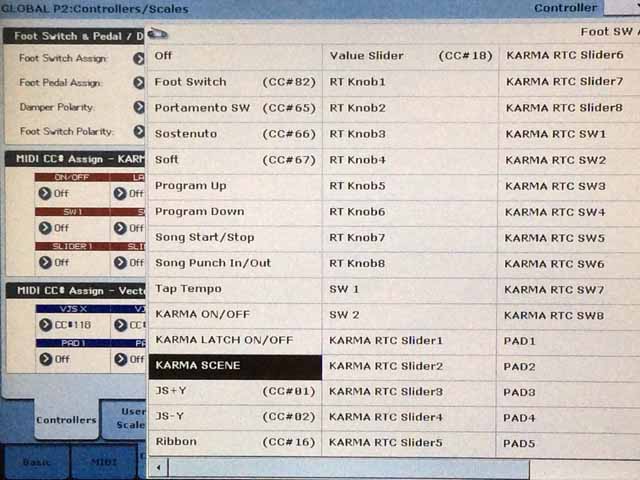
Like Stephen says, that method is only INC. But you could easily have switches 1 - 4 be repeated by 5 - 8, and just cycle through.
Agreed, especially if it's just straight forward switching of program to combi to combi. If that doesn't work for his needs, he can fall back on the other.GregC wrote:IMO go with set list
It should be simpler
Especially for a new k owner simple is better
Mike, Stephen - thanks for the prompt answers!Mike Conway wrote:In Global, I assign FOOT SW to KARMA SCENE.
I'm already using the foot switch for changing the Leslie speed, so I guess it wouldn't work for me (because the foot switch is assigned to sw 1 in the global).
Personally I find this karma scene switching better than using separate setlist slots. For instance this is the only way I'm sure the smooth sound transition works 100% every time. And also I like the way of having a one song containing all the sounds in one setlist slot.
Re: Soon to be owner of a Kronos
I found your PDF on the Internet yesterday outlining this procedure, and have watched the two YT videos linked above a few times as well.StephenKay wrote:Well, that's also true - you would think I, if anybody, would have suggested that.Mike Conway wrote:It might be possible to put all of those into a single combi and use KARMA Switching. Scene 1 would be the piano, Scene 2, the first split/layer, Scene 3, the second split/layer. Scene 4,5,6... any combination of each.
It's more work than making multiple set list slots, but ultimately more flexible.
I tried this out for a Combi I’m building for a song I’m working on, and this particular Combi has 5 total Programs in use. One of the voices is a pipe organ, which is only used for a small part in the middle of the song, so it seemed to be a good use of the Karma switching.
One of the sounds I am using is Cool Autowah Guitar, which has three insert effects chained together - Wah, Guitar Amp and O-verb. When I tried to use the Karma switching, it seems to bypass the effects for this timbre.
I would expect the Karma scene switching should merely activate the chosen sounds as they configured, no? I must be missing something along the way, but I spent a couple of hours and tried creating the Combi three times with the same results.
-
StephenKay
- KARMA Developer<br>Approved Merchant
- Posts: 2997
- Joined: Tue Jun 18, 2002 2:16 am
- Location: Scottsdale, AZ
- Contact:
Re: Soon to be owner of a Kronos
Correct.tunaman wrote:I would expect the Karma scene switching should merely activate the chosen sounds as they configured, no?
Re: Soon to be owner of a Kronos
I'm assuming that you've copied the programs with all IFXs (used in the program) to the combi? If you have, then I'd suggest to check the controllers in combi (especially SW1 and SW2 options) that they are not disabling the auto-wah effect. It's possible that program copied later than the guitar overwrites the settings previously set.StephenKay wrote:Correct.tunaman wrote:I would expect the Karma scene switching should merely activate the chosen sounds as they configured, no?
Kronos 2 - 73, Hammond A-100, Nord Electro 6D 61.